|
Increase Integer
|
Previous Top Next |
| You can set this value as a fixed internal template-defined value or as a user-variable value.
|
|
|
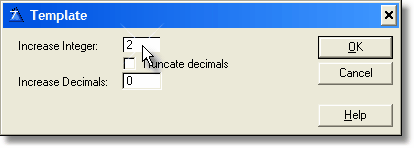
| Template
|
|
|
| Here you enter one of the numbers that makes the template work.
|
|
|
|
|
| This number specifies how many digits you want to add to the integer part of the current picture (whatever it is). This will only applies over pictures with decimals.
|
|
|
| For example, if you set a value of 3, the following changes occurs:
|
| @n10.3 à @n13.3
|
| @n9.2 à @n12.2
|
| @n6 à @n6 (doesn't change because it has no decimals)
|
| @n-10.2 à @n-13.2
|
|
|
| If you set a negative number, then you will subtract from the current picture.
|
| For example, if you set a value of -2, the following changes occurs:
|
| @n10.3 à @n8.3
|
| @n9.2 à @n7.2
|
| @n6 à @n6 (doesn't change because it has no decimals)
|
| @n-10.2 à @n-8.2
|
|
|
| This will work on every mask with integers and decimals, no matter how complex. For example, with an increase integer value of 2:
|
| @n-_10`3~U$S~B à @n-_12`3~U$S~B
|
|
|
| User Variable
|
|
|
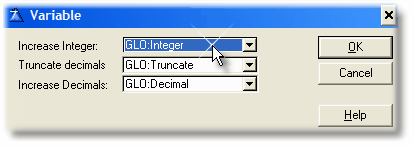
| Here you enter the name of the variable that affects the integer part of the numbers.
|
|
|
|
| This variable will contain a number that specifies how many digits you want to add to (or subtract from) the integer part of the current picture (whatever it is). This will only applies over pictures with decimals.
|
| The variable should be a SHORT.
|
| As the procedures of digit changer are globals, the variable should be global as well. The best option is to define it in the dictionary as Global Data, that way you won't have problems with multi-dll apps.
|
| When this variable contain a value, it will work exactly the same as the "Template" setting, so you can see the same examples above.
|
|
|