|
Report example
|
Previous Top Next |
| The "PrintEST:KeyYear" procedure shows a regular Wizard generated Report with several fields with "amount" data.
|
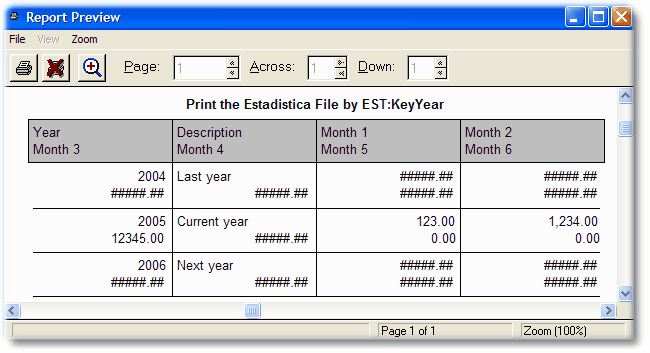
| When DigitChanger is deactivated, the report look like this:
|
|
|
| This is what happens when the picture isn't big enough to show the values.
|
|
|
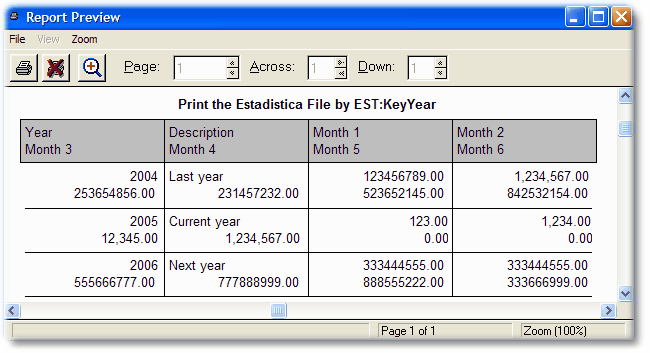
| If you activate the Increase Integer (or fill the variable) with a value of 4, this is how the window will look:
|
|
| Note that the fields that have "default" size (in this example Month 3 and Month 4) are resized and moved to the left. This may cause field overlapping if there is other fields to the left of the changed field.
|
|
|
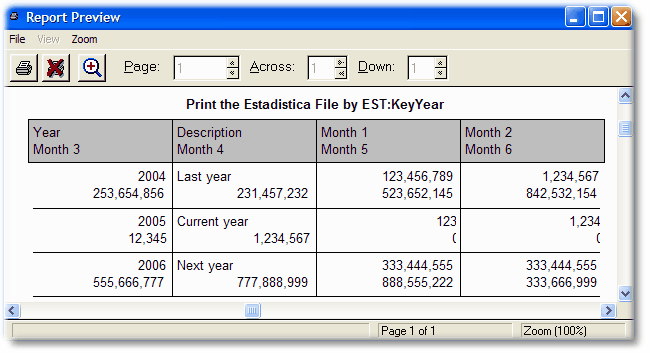
| If you Truncate decimals, the window will change to this:
|
|
| Note that the decimals are no longer there.
|
|
|
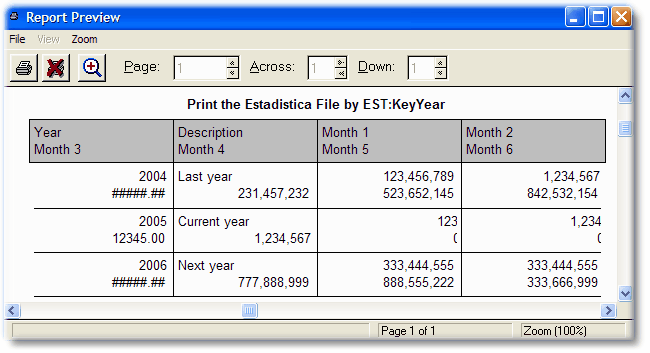
| Now suppose that there is a field that is not an amount, but a quantity (like a stock field). You don't want to touch this particular field, for example, "Month 3". If you set the Exception on the global area, you will see this:
|
|
| Note that all settings are in effect except for this field.
|
|
|