These options allows you to specify the values for the template to draw the button's borders automatically.
The option "Buttons border" allows you to disable this part of the template (no borders), or to specify if you want borders defined by the end user in run-time as shown in the example program ("User Variable") or set in the template ("Template").
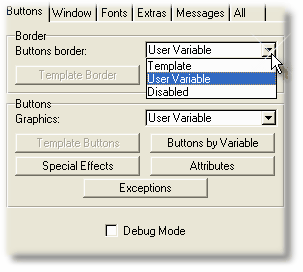
According to your selection, the proper button will be activated (or neither one).
This option (either by Template or by User variable) is optimal to use in conjunction with borderless buttons. If you combine it with buttons that already have borders, you will probably obtain bad results.
Using borderless buttons with this option gives you the advantage of using less graphics (just two of them instead of 5), and at the same time eliminates the border distorting problems whatever the buttons size and proportion is.