Sometimes you may have truncations on the printout of a Window. The issue seems related with a combination of Font types, sizes and probably the report being in millimeters. This issue is not usual but we had some reports of it, so we added a switch to "fix" it.
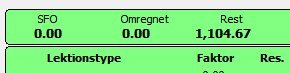
So for example you have a window that looks like this:
and when you send to print, it looks like this:
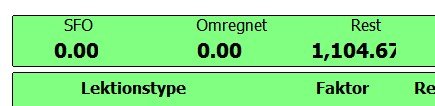
Note how the "7" is like sliced, it is truncated.
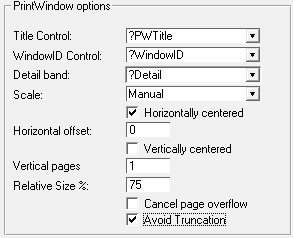
The "Avoid Truncation" option in the local extension of the Report, removes the Width and Height attributes of the String and Entry controls, so they are not truncated on print.
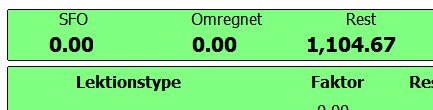
The above example, would look fixed like this:
Note: This fix may cause problems on some windows, if you rely on the Width to "contain" the content of a field, but the field is larger (for example, you have a narrow entry field with a mask of, say, @s200) then the report will actually show the 200 characters if you have them entered. This may be desired or undesired (If, for example, you have another field just to the right of the expanded one). As "Avoid Truncation" is a report option, you may have two reports, one for each alternative, and call the appropriate report from each window.