True Type Fonts (TTF) prints on report as well as on the window. However, may be your system is already done with a "screen only" font, like MS Sans Serif or something alike.
PrintWindow takes the font attributes of your windows to make the report, and that includes the Font type. When a "screen only" font is used in a report, you will find that
| • | The previewer cannot be zoomed accurately (The page changes its size, but the font remain the same or don't scale well, generating odds overlapping effects). Only 100% zoom is accurate. |
| • | Some characters on the printed page can be truncated. |
You should actually replace your windows font by a TTF in your program, but we provide a quick automatic global replacement option.
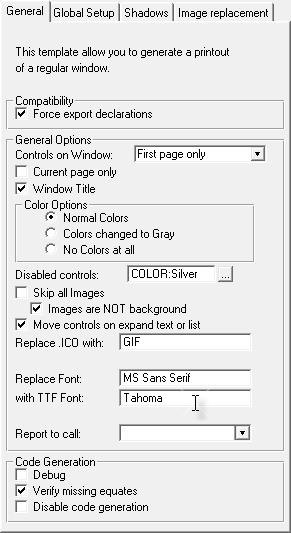
The option "Replace Font:" allows you to specify a not-TTF font and the option "with TTF Font:" a TTF replacement font. Only the font typeface will be replaced, as each control will have the same size, bold, underline, color, etc. attributes.
This option adds a lot of flexibility, but of course, keep in mind this:
| • | You have to type the font name exactly as it shows in the Windows Font Dialog. If you change even a letter case, the font won't be recognized. You can pick the names out of Clarion's windows editor. |
| • | The first font should be your window font, while the second font will be the one used in the report. They should be as alike as possible. For example, the TTF "Tahoma" is a good replacement for "MS Sans Serif", a very commonly used font for windows. |
| • | If you don't want to active this option, leave one or both spaces blank (empty). |
| • | If you pick an odd font as replacement, you can get unexpected results (like overlapping controls, or a printout completely different from the window). However you may generate interesting effects with this option. |