You might set up a window title by creating a single STRING or TEXT control in the report header. Then, you name which string control will act as window title, in the local extension for the report, using the "Title Control:" prompt.
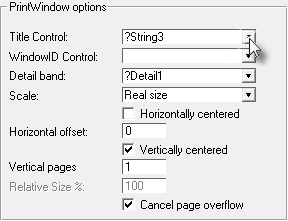
Inside the report, you should create the string or text control with the position, font, size and rest of attributes that you want the title to have for all the windows.

In this example, I picked an italic bold Verdana size 11, and create a long separator line just below. It doesn't matter what the string control says (here, "Title"), as it will be replaced with the window's title.
As you can see, you have total control on how the window title will print. You can mix it with whatever you want, i.e. graphics, your business logo, background, etc.
You define the separation between the Title and the printout as well, setting up the page header band height.
As the report printout may have several pages, I recommend that you use the header for the title, so you can see it in every page. If you choose the detail area instead, the title will print only in the first page.
You can actually pick any band you want to print the title, what's important is that you specify which control will hold the title in the local extension for the report.