Here you have some basic settings to change the aspect of your generated WindowID button.

Size: The generated button is a small 5x5 pixels square by default. You can change the size of the button with this setting. Keep in mind that a smaller button could be too difficult to find, and a bigger one could conflict or overlap with other controls in the window.
Offset: The generated button is separated 1 pixel from the window border, both vertically and horizontally. You can change this separation here.
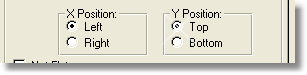
X Position (Left/Right): By selecting one of these radio buttons, you choose if the button will appear at the left side or at the right side of the window.
Y Position (Top/Bottom): By selecting one of these radio buttons, you choose if the button will appear at the top side or at the bottom side of the window.
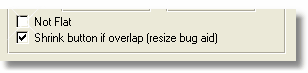
Not Flat: The generated button is normally Flat, thus invisible unless you hover it. If you want the button to be visible all the time, check this option so you will see the button on the upper left corner of each window.
Shrink button if overlap (resize bug aid): If you use the default top-left position for the WindowID button, you may trigger a Clarion bug (PTS 11315, which as of 14/8/06 is confirmed behaviour) preventing the resize of the Sheet and all its child controls. We added this global switch that will prevent this bug to happen, avoiding the overlapping of the control.
It works only in resizable windows. When you activate this option, and the window is resizable, it looks for any control that may overlap the WindowID button. If an overlap occurs, then it starts decreasing the offset of the button until it reach zero. If the overlap still occurs, then it begin to shrink the button (decreasing its size) one step at a time, until the overlap no longer occurs.
This way you may end with the button smaller on some windows, but your resize features won't be affected.
Note: As far as we know, this problem only exists with SoftVelocity's own resizer.