Using FileTuner as a standalone utility may be easy or not depending on your dct configuration. If you use variables to store file names or passwords, they won't be defined in the standalone utility, unless you somehow load them there (the same way you do in your own app). In that case, you'll need to declare the global variables, and load them with an appropriate value before "testing" the files. If you have lots of files under this situation, unless there is a powerful reason for not doing so, it will be recomendable to simply add the FileTuner procedures into your own app.
If you define your file names as hard-coded ones into your DCT, then the use of this utility is straight forward. When you open it with Clarion, you will get an error claiming the DCT is not defined;
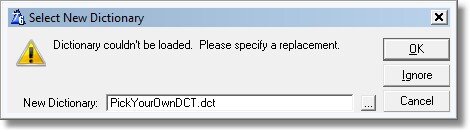
Enter your main DCT name in this dialog, and the utility will automatically link to your data.
Then, you need to take care of the following;
| • | If you use variables for naming your files, and you don't declare them in your DCT, you need to declare them in the global data section of the utility app. |
| • | In addition, if you use variables for naming your files, you need to load their values before the files are opened by the FTBrowseFiles procedures, otherwise you will be run-time prompted for each file name before it can be tested. |
| • | If you have fields referencing to files that are not in the app, you will have a compiler error: |
Syntax error: Unknown identifier: (Field name)
Where "Field Name" is the name of the field being referenced (Like in a lookup field or as initial value for the field). A cure to this is to include the referenced file in the app as well.