You need to import the FileTuner procedures into your app. They can run on any app of your system.
Pick your app and open it.
First, from the "File" menu, select the "Import From Application" option. Select the example that fits your program model (From the 3rdparty\examples\FileTuner folder);
FTA6.app For Clarion 6.x ABC
FTL6.app For Clarion 6.x Legacy
When you pick the proper app, you will get a warning saying that the "Dictionary couldn't be loaded. Please specify a replacement.".
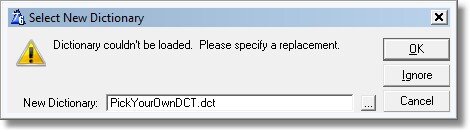
This is normal, as the example app is linked to an example dct (The name "PickYourOwnDCT" should give you a hint). Simply select your own app's dictionary.
Then, from the list of procedures, import all of the following ones:
FTBrowseFiles
FTConfiguration
FTGetParameters
FTGetPassword
FTSearchFile
You may simply pick all the procedures which name start with FT (Stand for FileTuner).
Into the global embed "Inside the global Map" of your app, copy the following line:
INCLUDE('CLIB.CLW'),ONCE
MODULE('Windows API')
GetLogicalDrives(),Long,PASCAL,Name('GetLogicalDrives')
GetDriveType(*cString),Long,Pascal,Raw,Name('GetDriveTypeA')
END
MODULE('Windows.DLL')
GetTempPathA(ULONG, *CSTRING),ULONG,PASCAL,RAW
END
Note: other utility or yourself might be using this library already. If that is the case, simply don't include it. You will note that you already have it declared because you will get "duplicate errors" warnings when compiling your app.
In the module for FTBrowseFiles you need to include the class declaration manually. Select the FTBrowseFiles procedure in the procedures tree, and change to the "module" view.

Press Enter or double click over the module (in the example above, registro019.clw, but note this should be your own app module).

Enter the "Embeds" button. Select the embed "Start of module", and include a source line of code containing:
include('filetuner.inc') like in the picture below:

Now select which files to include to tune (See Select files to Tune). Don't forget this step!
And finally, into the global settings of your app, "Individual File Overrides" Tab, you need to "generate file declaration" for each file that you will handle with FileTuner (You may simply set "Generate all file declarations" in the "File control" tab if it fit your app design). FileTuner by default takes all the files from your DCT. You may want to skip some of them (See the Skip files from the DCT chapter).
Now, make a menu entry pointing to FTBrowseFiles so your user may use FileTuner, compile and go.